You type www.example.com, press Enter, and a page appears in well under a second. It feels like magic, but it is a chain of very concrete steps: a name gets turned into a number, a signal crosses cables that may run along the ocean floor, and a machine somewhere in the world sends back files.
This post walks through that chain from the ground up. We start with the physical Internet, cross the oceans, and then spend most of our time on DNS, the system that turns names into addresses.
By the end you will be able to answer three questions:
- What is the Internet, physically?
- How does your browser find the server behind a name?
- Why is that lookup so fast, even at global scale?
1. The Internet is just wires
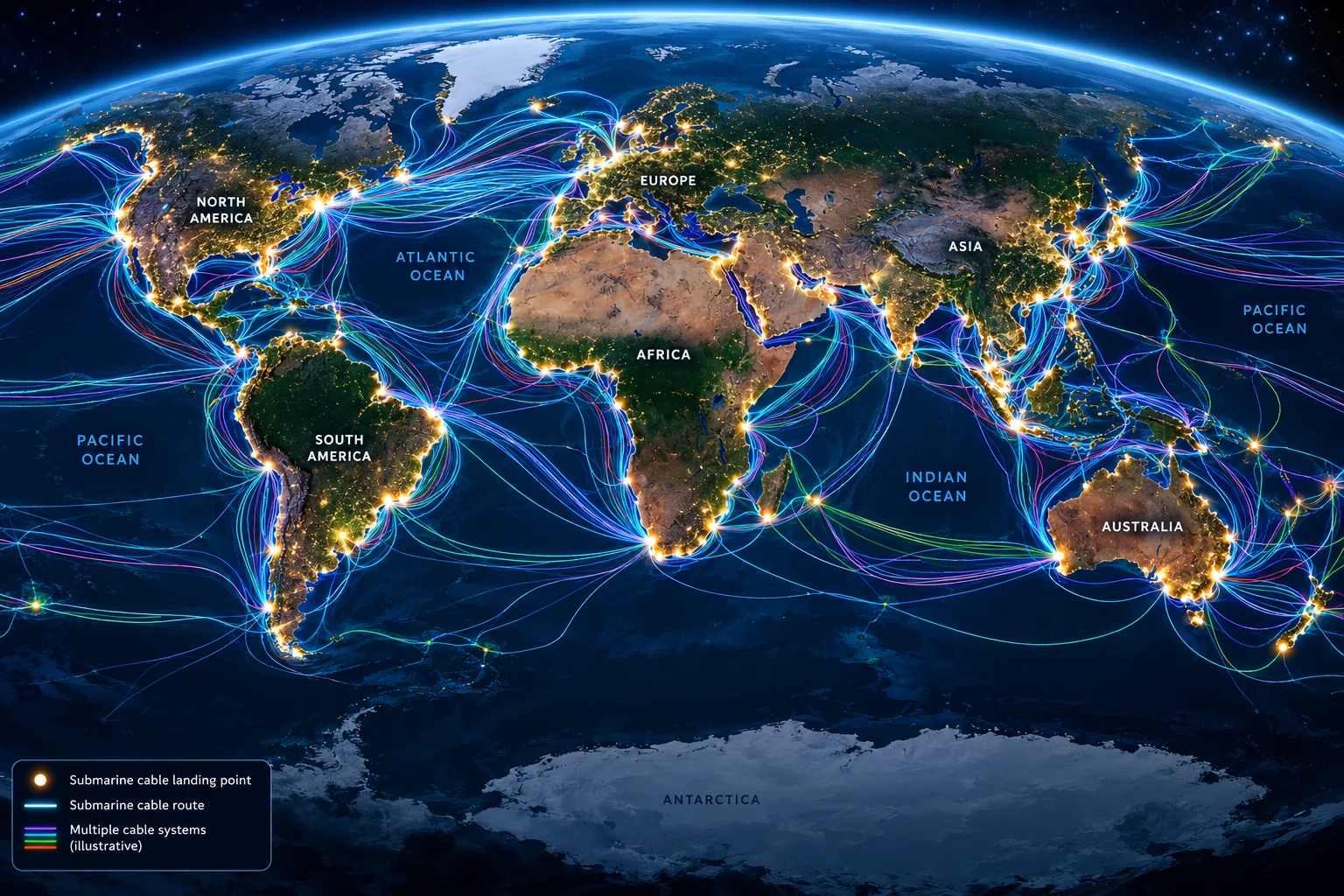
Strip away the jargon and the Internet is a giant network of cables connecting computers. A laptop in Bangalore can talk to a server in Seattle because an unbroken physical path of copper, glass fibre and short radio links joins them. Nothing floats in "the cloud". The cloud is other people's computers, connected by very long wires.
Every glowing line in the map below is a cable. The routes are illustrative, but the scale is real.
Clients and servers
In any conversation on the Internet, a computer plays one of two roles.
| Role | What it does | Examples |
|---|---|---|
| Client | Asks for data | Your laptop, your phone, your browser |
| Server | Stores data and serves it on request, online 24/7 | The machines behind google.com or example.com |
A useful picture: a server is a library that never closes. You can walk in at 3 a.m. and ask for a specific book, which here is a web page, and someone hands you the files.
IP addresses: postal codes for computers
Every device on the Internet has an IP address. Data is always delivered to an IP address, never to a name.
- IPv4 looks like
93.184.216.34: four numbers from 0 to 255, about 4.3 billion possible addresses. - IPv6 looks like
2606:2800:220:1:248:1893:25c8:1946: vastly more addresses, adopted because IPv4 ran out.
Names like example.com exist only because humans are bad at remembering numbers.
Your ISP: the on-ramp
Your Internet Service Provider is the company you pay for access: Jio, Airtel or ACT in India, Comcast or AT&T in the US, BT in the UK. The ISP connects your home network to the wider Internet. It also usually runs the DNS resolver your devices use by default, which will matter shortly.
2. Crossing the oceans
If the Internet is wires, what about the oceans? They are crossed by fibre-optic cables lying on the seabed. Satellites play only a small supporting role: FCC data cited by TeleGeography puts them at just 0.37% of US international capacity.
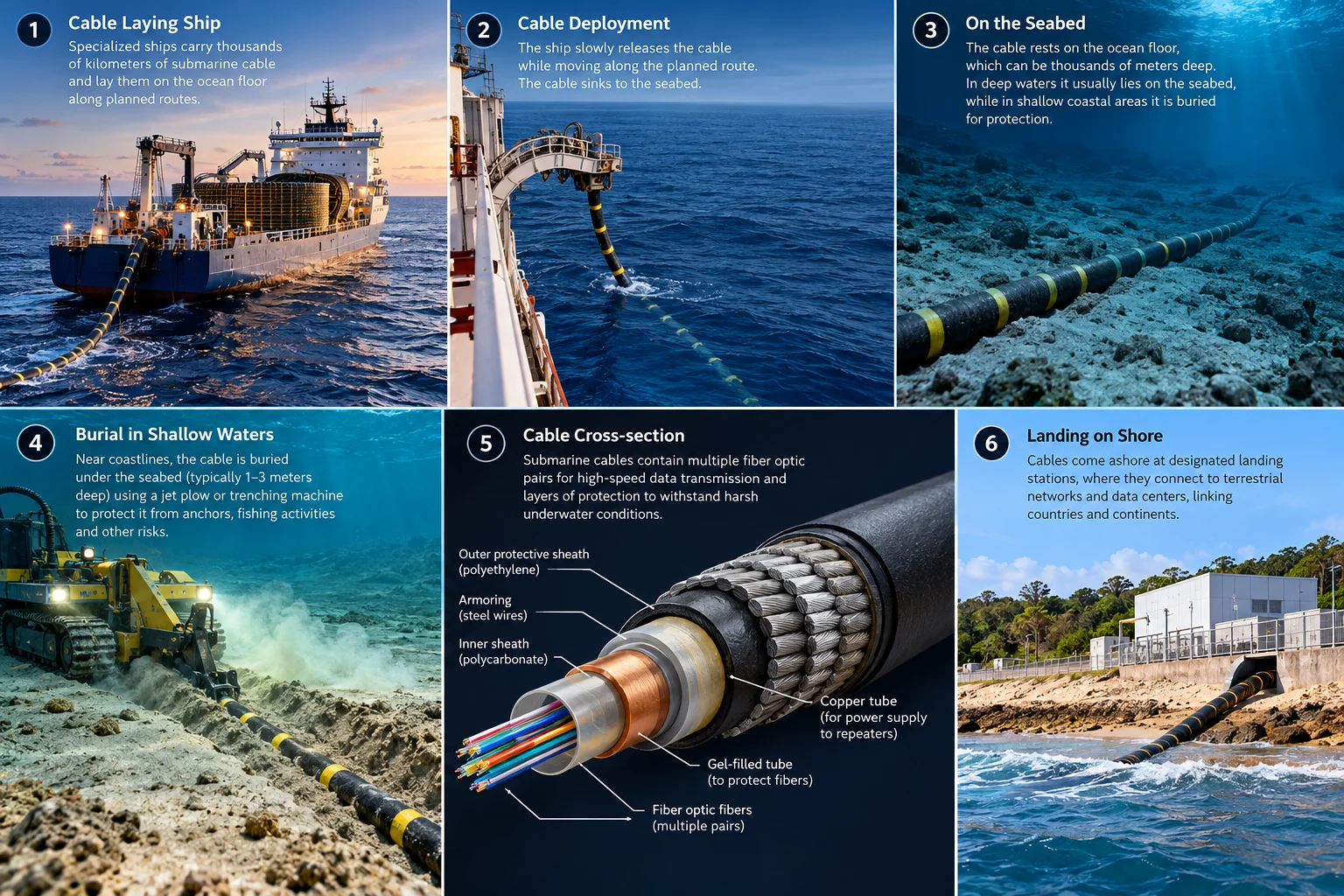
How a cable gets from one continent to another
- Cable-laying ship. Specialised vessels carry thousands of kilometres of cable.
- Deployment. The ship pays the cable out slowly as it moves along a surveyed route.
- Deep sea. On the ocean floor, often thousands of metres down, the cable simply rests on the seabed.
- Shallow water. Near the coast it is buried 1–3 m under the seabed to protect it from anchors and trawlers.
- Inside the cable. Hair-thin glass fibres sit at the centre, surrounded by a gel-filled tube, a copper conductor that powers repeaters along the route, steel wire armour and a polyethylene sheath. In the deep ocean the whole cable is about as wide as a garden hose.
- Landing station. The cable comes ashore at a landing station, where it connects to land networks and data centres.
The numbers, as of 2026
| Fact | Figure |
|---|---|
| Cables tracked, active and planned | 600+ |
| Cable length in service | 1.5 million+ km |
| Fibre pairs in one cable | 8–24 |
| One wavelength of laser light, across an ocean | about 0.8–1.2 Tb/s |
| One fibre pair, all wavelengths combined | high tens of Tb/s, e.g. 27 Tb/s on Asia Link Cable |
| One whole cable: MAREA (US–Spain) | 224 Tb/s |
| One whole cable: Asia Link Cable, landed May 2026 | 325+ Tb/s design capacity |
| Cable faults per year | about 200, two-thirds caused by fishing and ship anchors |
| Design life | 25 years |
Sources: TeleGeography, Hengtong, Submarine Networks.
How capacity stacks up
Headline "Tbps" numbers are easy to misread, because capacity comes in three layers:
- Wavelength: one colour of laser light, carrying up to about 1 Tb/s over ocean distances.
- Fibre pair: dozens of wavelengths share one pair of fibres, one for each direction.
- Cable: up to 24 fibre pairs bundled together. Press releases almost always quote this whole-cable figure.
Closer to home
Mumbai and Chennai are India's main cable landing hubs. Google has also broken ground on a US$15 billion AI hub in Visakhapatnam that includes a new international subsea cable gateway, per Submarine Networks. Open submarinecablemap.com and click on Mumbai or Chennai to see every cable that lands there.
3. What happens when you type www.example.com
Here is the key idea of this whole post: the browser cannot reach a server by name. It needs an IP address first. Getting that address is DNS's job.
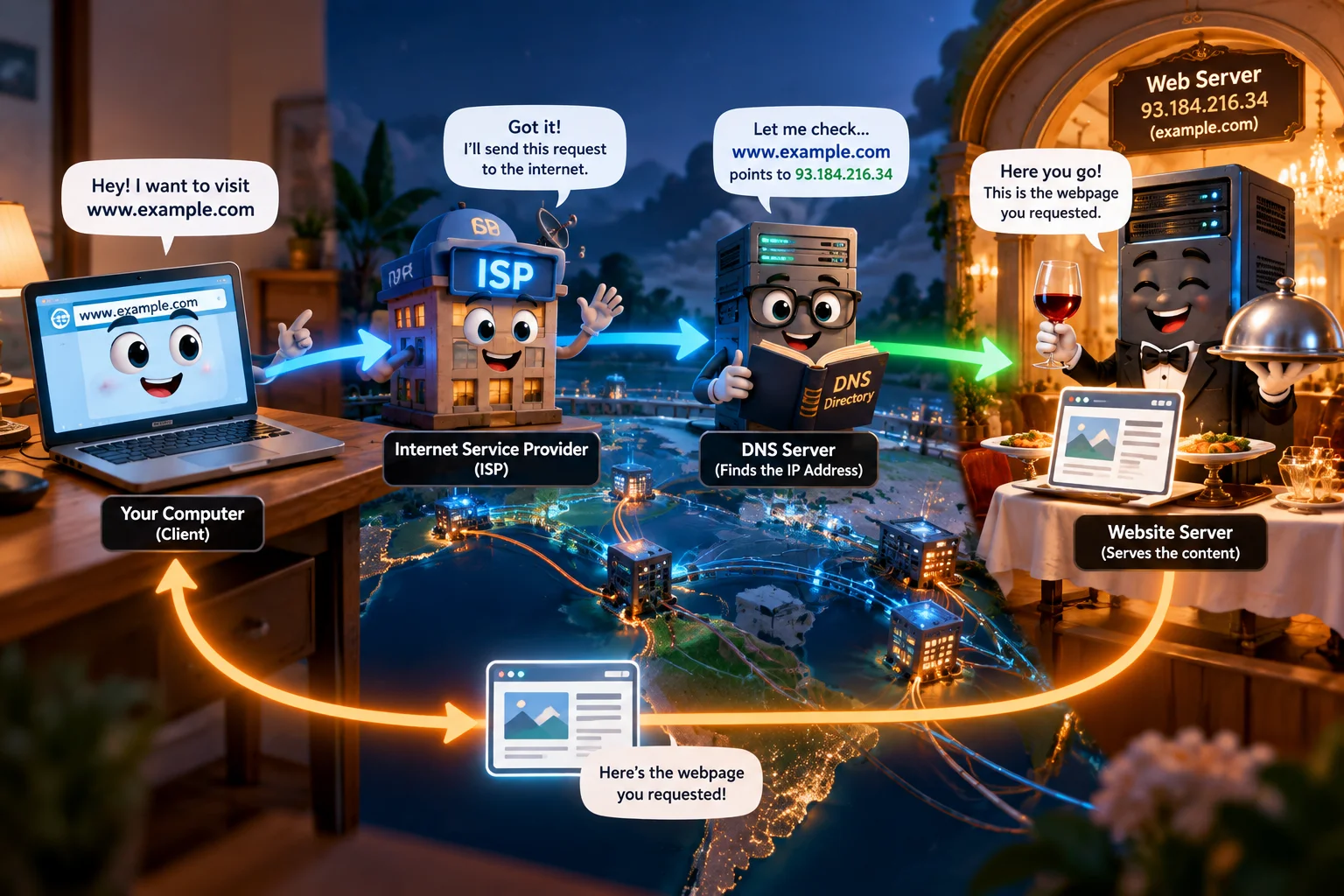
Think of it like dining out. DNS is the directory that tells you where the restaurant is. The web server is the waiter who brings your dish. You look up the address first, then you go there.
One detail the illustration simplifies: the page does not travel through the DNS server. DNS hands the IP back to your browser, and your browser then talks to the web server directly.
Two trips, four stages
- Find. DNS turns
www.example.cominto an IP address. - Connect. The browser opens a TCP connection to that IP. For HTTPS it also performs a TLS handshake to set up encryption.
- Request. The browser sends an HTTP request, for example
GET /. - Render. The server replies with HTML. The HTML pulls in CSS, JavaScript and images, and the browser draws the page.
A note on example.com
example.com is a domain reserved for documentation, which is why it appears in so many tutorials. The IP 93.184.216.34 is its long-standing historical address. Its hosting has changed over time, so if you look it up today you may see different IPs. That is DNS doing exactly its job: the name stayed the same while the address underneath it moved.
4. How DNS finds the IP
DNS (Domain Name System) converts a domain name into an IP address so the browser can connect to the server. It is often called the phone book of the Internet, but it is not one book. It is millions of small ones, organised as a tree.
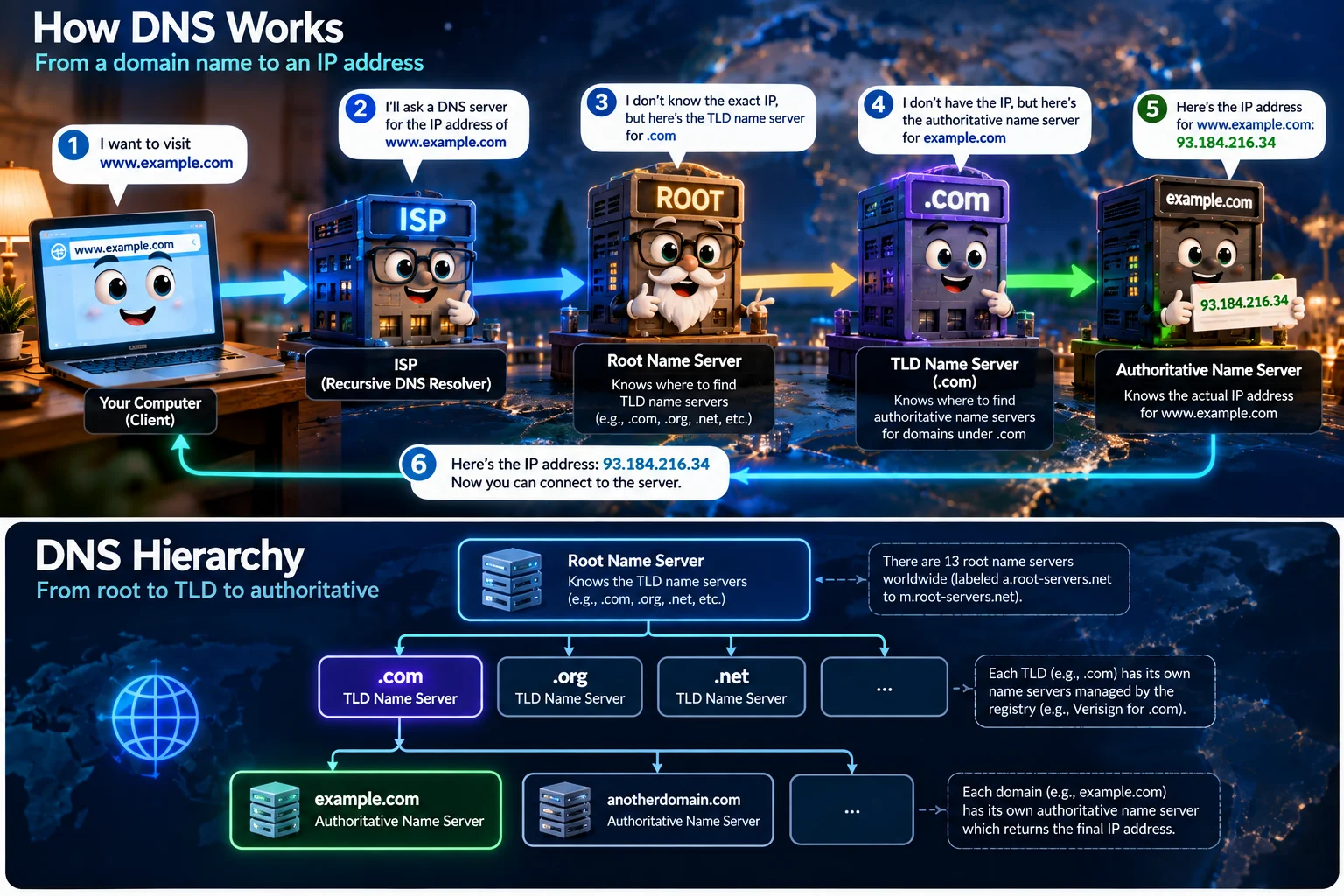
The resolution flow, step by step
- You type
www.example.com. - Local caches are checked. The browser and operating system look for a saved answer. If they have one, we are done.
- The recursive resolver takes over. On a miss, your device asks a recursive resolver, usually run by your ISP or a public service like Google (
8.8.8.8) or Cloudflare (1.1.1.1). - Root server. The resolver asks a root server. The root replies: "I don't know the IP, but here are the servers for
.com." - TLD server. The resolver asks a
.comserver. It replies: "Here are the authoritative servers forexample.com." - Authoritative server. The resolver asks
example.com's own server, which replies with the IP address. - Answer and cache. The resolver returns the IP to your browser and saves it for next time. Your browser connects directly to the web server.
The resolver does all the walking. Your browser asks one question and gets one answer back.
Who does what
| Server | What it knows | What it returns | Who runs it |
|---|---|---|---|
| Recursive resolver | Nothing permanently. It caches answers | The final IP, to your device | Your ISP, Google, Cloudflare, Quad9 |
| Root server | Where every TLD's servers are | A referral to the TLD servers | 12 independent organisations |
| TLD server | Which authoritative servers handle each domain under it | A referral to the authoritative servers | The registry, e.g. Verisign for .com |
| Authoritative server | The actual records for a domain | The final answer | The domain owner or their DNS host |
Why a tree and not one big table?
A single global table mapping every name to every IP would be enormous, would change constantly, and would be a single point of failure. The hierarchy splits the work: each registry manages its own TLD, and each domain owner manages their own records. No one machine has to know everything.
What "13 root servers" really means
You will often read that the Internet has 13 root servers. More precisely, it has 13 root server identities, named a.root-servers.net to m.root-servers.net, run by 12 independent organisations. The number 13 dates back to the 512-byte limit on DNS responses in the original 1987 specification.
Behind each letter is a fleet of machines sharing the same IP address through a technique called anycast. As of August 2026 there were 2,003 root server instances worldwide, together answering about 1.6 million queries per second (Make Tech Easier, citing root-servers.org).
Recursive vs iterative queries
Your device sends a recursive query: "Get me the final answer." The resolver then makes iterative queries: each server it asks gives a referral, and the resolver follows it until it reaches the authoritative answer.
5. Anatomy of a domain
Read a domain name from right to left. The most general part is on the right, the most specific on the left, which mirrors the order DNS resolves it.
| Part | In www.example.com | What it means |
|---|---|---|
| Root | the invisible trailing dot: www.example.com. |
The top of the DNS tree |
| TLD (top-level domain) | .com |
The part after the final dot |
| Domain | example.com |
The name someone registers and owns |
| Subdomain | www.example.com |
A name the owner creates under their domain |
An owner can create as many subdomains as they like without registering anything new: blog.example.com, api.example.com, shop.example.com.
Types of TLD
- Generic TLDs: .com, .org, .net, .dev, .live, and many more.
- Country-code TLDs: .in for India, .uk for the United Kingdom, .jp for Japan.
- Second-level country domains: some countries add another layer, such as .co.in or .co.uk.
6. Public vs private DNS
Not every name is meant for the whole Internet.
| Public DNS | Private DNS | |
|---|---|---|
| Purpose | Internet-facing names | Internal services and infrastructure |
| Example | www.example.com | payments.svc.cluster.local |
| Who can resolve it | Anyone on the Internet | Only machines inside the network |
| Lookup path | Root → TLD → Authoritative | Usually an internal DNS server answers directly |
| Typical tools | Cloudflare DNS, Route 53 public zones | Route 53 private zones, Kubernetes CoreDNS, Active Directory |
A familiar example for developers: inside a Kubernetes cluster, one microservice can call http://payments and the cluster's DNS resolves that to the right pod IP. That name means nothing on the public Internet, and it never touches a root server.
7. Why DNS is so fast: caching, TTL and scale
If every lookup walked root → TLD → authoritative, browsing would feel sluggish. It doesn't, for two reasons: answers are cached at many levels, and the infrastructure is replicated all over the world.
Caching at every level
A lookup checks these places in order, and the first one with an answer wins:
- Browser cache. In Chrome you can inspect it at
chrome://net-internals/#dns. - Hosts file on your disk.
- Operating system cache.
- Home router cache.
- Recursive resolver cache at your ISP or public resolver, shared by thousands of users.
- The full DNS walk, only when every cache above has missed.
In practice, most lookups never reach a root server. A cached answer comes back in a few milliseconds or less. A full walk can take tens to hundreds of milliseconds.
Hosts file vs DNS cache
These two are often confused, but they are different things.
| Hosts file | DNS cache | |
|---|---|---|
| What it is | A plain text file on disk | Entries held in memory |
| How long it lasts | Until someone edits it | Until the TTL expires or the device restarts |
| Who fills it | You or an administrator, by hand | Filled automatically from DNS answers |
| Where it lives | /etc/hosts on macOS and Linux, and C:\\Windows\\System32\\drivers\\etc\\hosts on Windows |
Browser, OS, router, resolver |
| Typical use | Pointing a name at a local or test server | Speeding up repeat lookups |
TTL: how long an answer stays fresh
Every DNS record carries a TTL (time to live), set in seconds by the domain owner. It tells every cache how long it may keep the answer before asking again.
| TTL | Example | Trade-off |
|---|---|---|
| Long | 3600 (1 hour) | Fewer lookups and faster browsing, but changes spread slowly |
| Short | 60 (1 minute) | Changes spread quickly, but caches ask more often |
This is why a DNS change is said to "propagate". Old answers live on in caches around the world until their TTL runs out. A practical tip: lower a record's TTL a day before migrating a server, then raise it again once the move is done.
Built for global scale
Root servers, TLD servers and big public resolvers are never single machines. They use anycast: the same IP address is announced from many locations at once, and the network routes each query to the nearest one. If one site goes down, traffic simply flows to the next closest. One IP does not mean one server.
Lookup is not search
Typing a domain in the address bar is a lookup: DNS turns a known name into an IP. Typing words that are not a domain sends them to a search engine instead, which uses its own index of pages, not DNS. The two only look similar because they share the same box in your browser.
8. Try it yourself
You can watch everything in this post happen on your own machine. nslookup works on Windows, macOS and Linux. dig is built into macOS and Linux. On Windows, use WSL or an online dig tool.
Find the IP behind a name
nslookup www.example.comNo terminal? The website nslookup.io does the same in your browser.
Watch the whole DNS walk, root to answer
dig +trace www.example.comThe output shows the root servers first, then the .com servers, then example.com's authoritative servers, and finally the IP. It is the hierarchy from section 4, live.
See the TTL counting down
dig www.example.comRun it twice, a few seconds apart. The number next to the record gets smaller. That is the cache timer running.
Ask different resolvers the same question
nslookup www.example.com 8.8.8.8
nslookup www.example.com 1.1.1.1
Google and Cloudflare give you the same answer, because both end up asking the same authoritative server.
Explore the cables under the sea. Open submarinecablemap.com and click any coastal city to see which cables land there and where they go.
9. Key takeaways
- The Internet is physical. It is cables and computers, including 1.5 million+ km of cable on the ocean floor.
- Computers talk by IP address. Names exist only for humans.
- DNS turns names into IPs by walking a tree: root → TLD → authoritative. Only the authoritative server returns the actual IP.
- Caching and TTL keep DNS fast. Most lookups never leave your machine, router or resolver.
- Anycast keeps DNS resilient. One IP address can stand for thousands of machines around the world.
Frequently asked questions
Can I just type the IP address instead of the name? Sometimes. But many websites share one IP behind a CDN or load balancer, and HTTPS certificates are issued for names, so an IP alone often fails or shows a warning.
What happens if DNS goes down? Names you visited recently keep working until their cached TTL expires. New lookups fail, so websites appear "down" even though their servers are perfectly fine.
Who owns the Internet? No single party. Cables are owned by telecom operators and large tech companies, domains by registries and the people who register them, and the root servers by 12 separate organisations.
Is DNS encrypted? Classic DNS travels as plain text. DNS over HTTPS (DoH) and DNS over TLS (DoT) encrypt it, and most modern browsers support DoH.
Is my phone's mobile data wireless all the way? Only as far as the nearest cell tower. From there, your data travels over fibre cables on land and under the sea.
Do sharks bite undersea cables? Very rarely. Most faults are caused by fishing gear and ship anchors. Traffic reroutes over other cables while the damaged one is repaired.
Does Google Search use DNS to find pages? No. Search engines use their own index of the web. DNS only turns a name you already know into an IP address.
Sources
- TeleGeography, Submarine Cable FAQs: cable count and length, MAREA capacity, fault causes, satellite share, design life.
- Hengtong, Submarine Cable Capacity in 2026: What's Real?, April 2026: capacity per wavelength, per fibre pair and per cable.
- Submarine Networks, World Telecommunication Day 2026 Special Issue, May 2026: Asia Link Cable, Visakhapatnam cable gateway.
- Make Tech Easier, The 13 root server clusters, August 2026: root server instance count, query volume, origin of the number 13.